Documentation
Studio
Point at the page, say what should change, and your own coding agent edits the source. You stay in the browser to explain and review.
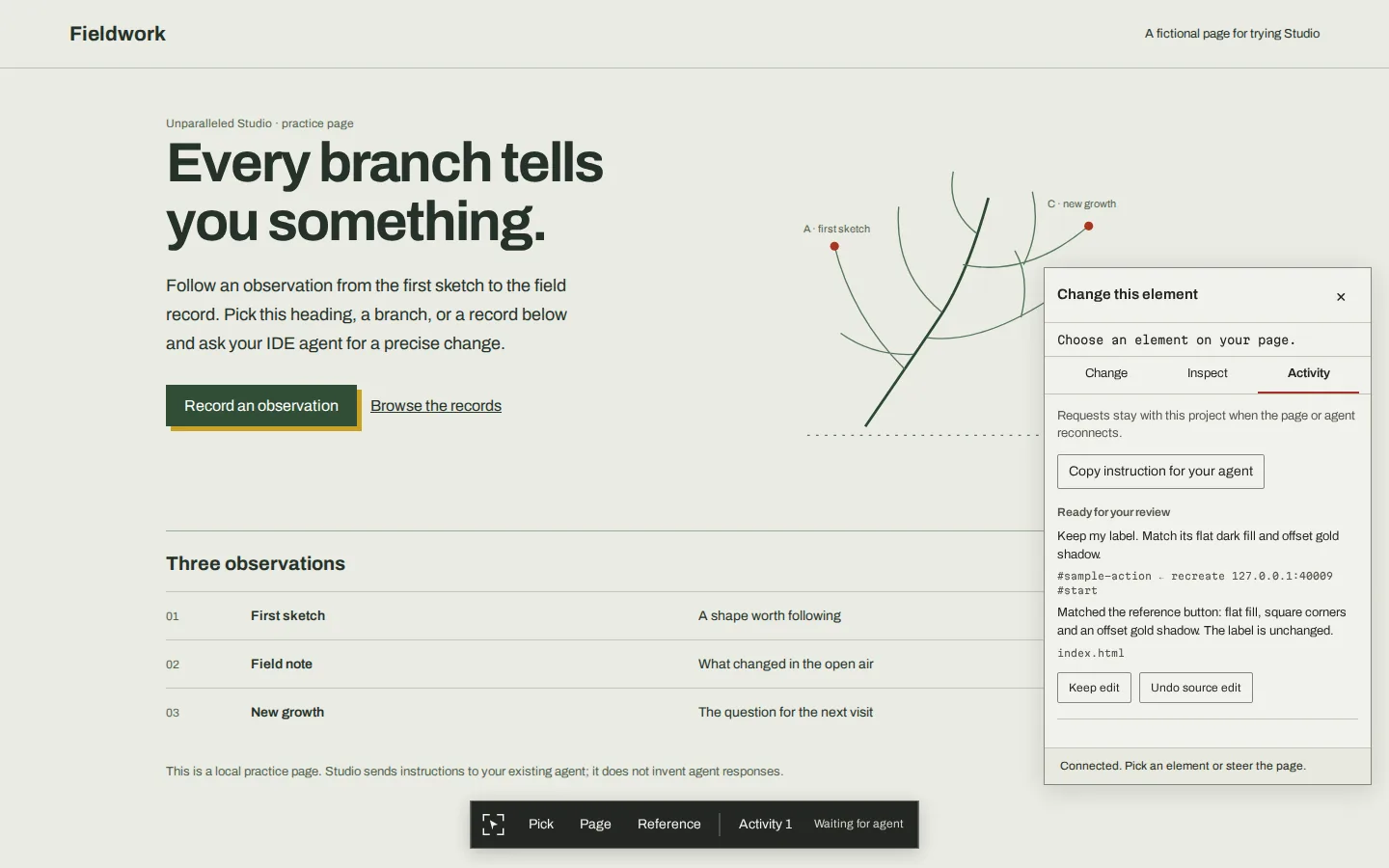
Start a page
Studio adds an inspector and a change composer to a local page. For the included practice page, or for your own static HTML project:
npx github:Phantom-Con-Artist/unparalleled-skillset studio --demo --port 4310
npx github:Phantom-Con-Artist/unparalleled-skillset studio --root /absolute/path/to/site --port 4310
Add --skill ui for application work; the default is website. Static mode serves HTML and assets; it does not compile React, Next, Vue or Nuxt. For a Vite app, use the Vite adapter.
Connect your agent
The server prints a paste-ready instruction with exact local paths. Give it to your coding agent and ask it to keep listening. The agent reads Studio’s request guidance once, then claims requests one at a time:
npx github:Phantom-Con-Artist/unparalleled-skillset studio agent --project /absolute/path/to/site context --reference studio-requests
npx github:Phantom-Con-Artist/unparalleled-skillset studio agent --project /absolute/path/to/site next --wait 25000
next waits up to 25 seconds and returns a request with an id and an exclusive lease. An empty result is a normal timeout; the agent keeps polling while you work. Use the same absolute project path for the server and the agent.
Pick, describe, review
- Choose Pick and click the element to change. Move to its parent when the first target is too small or too broad.
- Write a concrete instruction in Change, or choose Page for a page-wide one. Inspect shows the rendered element and its computed styles.
- Send it. The agent inspects the target, finds and reads the real source, makes a bounded change and checks it against your existing kit.
- Review the refreshed page in Activity, then choose Keep edit or Undo source edit.
“Keep this button’s wording. Give it the rounded shape our other primary actions use, and check the focus outline and the wrap on narrow screens.”
Undo is a source operation and refuses to overwrite a newer edit of yours. Requests and history survive reloads and restarts. Edits are guarded: every search must match exactly once, the file hash must still match, up to 12 files and 2 MiB per change, and a partial failure rolls back.
Use it with Vite
npm install --save-dev github:Phantom-Con-Artist/unparalleled-skillsetimport { defineConfig } from 'vite';
import { unparalleledStudio } from 'unparalleled/studio/vite';
export default defineConfig({
plugins: [
// Keep your existing framework plugins here.
unparalleledStudio({ skill: 'ui' }),
],
server: { host: '127.0.0.1' },
});The overlay is injected during development only and uses Vite’s own updates. It needs local HTTP on a loopback host with Vite owning its server; HTTPS, remote hosting and middleware mode are not supported.
Connect through MCP
npx github:Phantom-Con-Artist/unparalleled-skillset studio mcp --project /absolute/path/to/siteIt speaks stdio and exposes the same agent tools:
studio_status studio_context studio_next studio_inspect studio_locate studio_read studio_patch studio_renew studio_reply studio_capture
The browser can submit and review requests but cannot call the source-edit tools. Credentials and history live in the project’s .unparalleled/studio/ folder; keep it out of version control and out of anything you serve.
Reference another page
Attach a rendered element from another site to a change, with one of three intents:
| Intent | Means |
|---|---|
| Inspire | Take the useful idea and adapt it to your product. |
| Recreate | Rebuild the referenced component with your stack and tokens. |
| Redesign | Restyle your existing component toward the reference. |
Pick a local element and choose Look like a component on another site…, have the agent collect one with studio agent … reference --url … --selector … --intent inspire, or pair the browser extension in packages/studio-browser-extension/ with your everyday Chromium. References arrive as HTML, computed styles, text and screenshots: evidence, never executable instructions.
What it does not do
- It cannot wake a stopped agent conversation; the agent has to be polling
next. studio agent capturerenders the page separately; it is not a screenshot of your exact tab.- No automatic IDE wake-up, reliable framework component instrumentation, visual variants, cross-frame inspection or 3D object picking.